
If you have entered the wrong PIN three times you will need to use your PUK code to enable your SIM card. You can find your PIN and PUK codes on the plastic frame that the SIM card came in.
Note: If you have changed your PIN your new PIN will not be visible in the Telavox desktop app or in the webapp. Instead the original PIN will be displayed.
Finding the PIN and PUK codes for administrators
If you are an administrator you can find all the original PIN codes for users on the admin page.
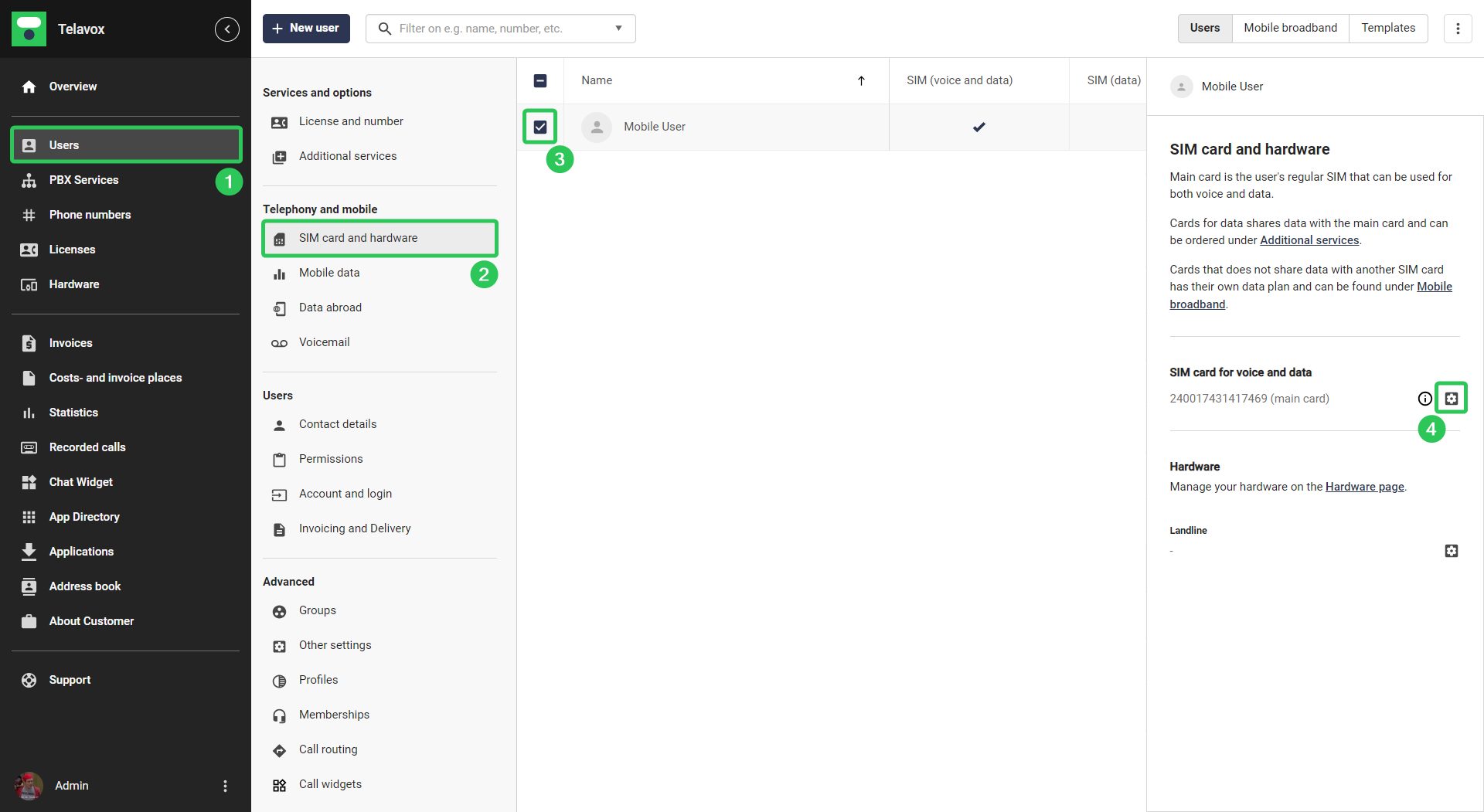
Here is how you can find the original PIN code as an administrator:
Start by logging into the Admin portal
- Click on Users
- Click on SIM card and hardware
- Select a user
- In the right hand menu that appears, click on the gear icon next to the SIM card number
You will then be able to see the PIN and PUK codes for the selected card in the window that appears
Finding the PIN and PUK codes for regular users
If you are not an administrator you can find your original PIN on the Telavox softphone (desktop app) or the webapp.
To find the original PIN in the softphone or webapp:
- Go to Settings
- Go to Mobile
- Choose Main card if you need the PIN and PUK codes for you main SIM card
- Choose Twin card if you need the PIN and PUK codes for your data twin card (if you have the additional service)
3. Click on SIM details

4. Here you will find the PIN and PUK codes for the chosen card
Removing a PIN code
It is possible for you to remove your SIM card's pin code. Here is how you can do it on an Android and an iOS mobile phone:
Remove PIN code on SIM card (Android):
- Go to Settings
- Select Security and Privacy (or Lock screen and security)
- Select Other security settings > Set up SIM card lock
- Turn off the toggle for Lock SIM card
- Enter your current PIN code
Remove PIN code on SIM card (iPhone):
- Go to Settings
- Select Mobile Data (or Cellular)
- Select SIM PIN
- Turn off SIM PIN by entering the code